
Download Pizza Timer – homemade pizza, cooking guide, step-by-step recipe, Android app, easy pizza recipe, cooking timer, pizza making, recipe app, cooking app
Overview
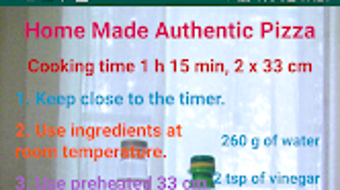
Pizza Timer is a lifestyle-focused Android application developed by Евгени, designed to simplify the process of making homemade pizza. The app serves as a guided cooking tool, offering a structured approach to preparing pizza from scratch with a total cooking duration of 1 hour and 15 minutes. It targets home cooks, especially beginners, who wish to create a delicious pizza without prior experience or advanced culinary skills. The software integrates a cooking timer with a visual step-by-step recipe, enabling users to follow each stage of the process with clarity. Real-world usage scenarios include weekend kitchen projects, family meal preparations, or casual attempts at replicating restaurant-quality pizza at home. The app’s primary function is to reduce the complexity of pizza-making by breaking down the process into manageable stages, ensuring users stay on track. While the developer did not provide additional information about the company or background, the app’s purpose is clearly focused on accessibility and user support. It is intended to enhance the cooking experience by combining timing functionality with instructional guidance, making it ideal for casual cooks seeking a reliable, straightforward solution.
Key Features & Capabilities
- Step-by-Step Recipe Guidance – The app provides a visual, sequential breakdown of the pizza-making process, allowing users to follow each stage in order. This helps maintain consistency and reduces the chance of missing key steps.
- Integrated Cooking Timer – A built-in timer tracks the total cooking time of 1 hour and 15 minutes, with possible sub-timers for individual stages such as dough rising, baking, and resting.
- Beginner-Friendly Instructions – Designed for users with average cooking skills, the app uses simple language and clear visuals to explain techniques like kneading, shaping, and topping placement.
- Visual Recipe Display – Each step is accompanied by graphics or illustrations that enhance understanding, particularly useful for users who learn better through visual cues.
- Time Management Support – By synchronizing the timer with the recipe steps, the app helps users manage multiple stages without confusion or time mismanagement.
These features collectively support a seamless cooking workflow, particularly beneficial for individuals preparing their first homemade pizza. The structured approach ensures users can focus on execution rather than planning, making the experience less stressful and more enjoyable. The app’s functionality is tailored to reduce common beginner mistakes such as under-kneading dough or overbaking the crust.
User Interface, Workflow & Performance
The user interface of Pizza Timer is described as user-friendly and straightforward, emphasizing clarity and ease of navigation. The layout is likely organized in a linear format, progressing through recipe stages with minimal distractions. Users can expect a clean, intuitive design that prioritizes accessibility, with large buttons and visual cues to guide interaction. Navigation appears to be sequential, aligning with the step-by-step nature of the recipe. Workflow efficiency is enhanced by the integration of the timer with each stage, allowing users to transition smoothly from one step to the next without needing external tools. The app’s performance is not detailed in the provided information, but based on its lightweight size of 15.2 MB and its focus on basic functionality, it is expected to operate smoothly on standard Android devices. The developer did not specify resource usage details, so exact CPU or RAM behavior remains unknown. Stability during extended use is not confirmed, though the app’s simple design suggests low risk of crashes. General performance observations are based on typical behavior of lightweight Android applications.
Compatibility & System Requirements
Pizza Timer is designed for Android operating systems. The specific version requirements were not provided, but the app is compatible with devices running a recent Android OS. Installation size is listed at 15.2 MB, indicating a lightweight footprint suitable for most mobile devices. The developer did not specify exact hardware requirements, such as minimum RAM or processor speed. Compatibility information was partially provided, with the operating system clearly stated as Android. Users should ensure their device meets standard Android app requirements to run the application. The developer did not provide additional system requirements, so further details on device compatibility are unavailable. It is recommended to check the app’s availability on the official Android marketplace for updated compatibility notes.
Pros and Cons
Pros
- Simple, beginner-friendly interface ideal for novice cooks
- Step-by-step visual guidance enhances understanding and reduces errors
- Integrated timer supports accurate time tracking during cooking
- Free to download and use, with no in-app purchases mentioned
- Lightweight size (15.2 MB) ensures fast installation and minimal storage use
Cons
- No information on compatibility with specific Android versions
- Limited to Android platform; no support for iOS or desktop systems
- Exact performance and resource usage details were not specified
- Only one recipe is available based on the provided description
- Offline functionality is not confirmed, though likely given the nature of the app
FAQ Section
Is Pizza Timer available for iOS devices?
The app is currently designed for Android operating systems. There is no information available about iOS compatibility or a version for Apple devices.
Is the app free to use?
Yes, Pizza Timer is free to download and use. No pricing details were mentioned beyond the free status.
Does Pizza Timer require an internet connection?
The app’s functionality appears to be based on local recipe and timer features. While online connectivity is not required for basic use, the developer did not specify whether updates or additional content require internet access.
Can I use Pizza Timer offline?
Given the app’s reliance on preloaded recipes and a built-in timer, it is likely usable offline. However, the developer did not confirm this capability explicitly.
How often is the app updated?
Release date information indicates the initial version was published on September 25, 2023. No details were provided about update frequency or future development plans.
Final Thoughts
Pizza Timer offers a focused, accessible solution for home cooks eager to make pizza from scratch without stress. Its combination of visual step-by-step instructions and an integrated timer streamlines the cooking process, making it ideal for beginners and casual users. While the app is limited to Android and lacks detailed technical specifications, its lightweight design and free access make it a practical choice for anyone interested in homemade pizza. The emphasis on simplicity, clarity, and user guidance reflects a thoughtful approach to enhancing the cooking experience. For those seeking a reliable, no-frills tool to guide them through a 75-minute pizza-making journey, Pizza Timer delivers on its core promise. Download Pizza Timer now.




.png)


